

Being a content creator in 2026 means wearing every hat at once. You're a content strategist, editor, writer, community manager, and marketer, often all before lunch. That's the cost of surviving the creator economy. That's why the tools you choose don't just save time; they determine how much of your creative energy actually goes toward creating.
This isn't a list of every tool that exists, but it's the five that consistently earn their place in a working creator's stack, split across two categories (for now): automation and video editing.
Automation Tools: Work Less, Reach More
In the age of AI you often stumble across two groups of people: early adopters and the hesitant. The conversation between the latter is always the same too. Won't AI and automation replace content creators in the future?
On the contrary, automation doesn't replace your voice. It handles the repetitive, time-consuming tasks that would otherwise eat your day. So when you do show up, you're showing up with intention. You can read more about creating intentionally in newsletter resources like The Muse Letter.
Here are some of the best automation tech for content creators:
ManyChat: DM and Comment Automation

If you've ever posted a Reel and spent the next hour manually DMing or responding to the comments of everyone who commented, ManyChat is the fix. It's a multi-channel automation platform that converts social media engagement into real conversations and real leads, without you lifting a finger.
The most powerful use case for creators is the comment-to-DM trigger. Post a caption like "comment LINK for the full resource" and ManyChat automatically sends a personalised DM to every person who comments 'LINK'. It works across Instagram, Facebook Messenger, WhatsApp, TikTok, and more from a single dashboard.
In 2026, ManyChat overhauled its pricing structure to five tiers: Free, Essential, Pro, Business, and Advanced. The Free plan covers up to 25 active contacts — enough to test, not enough to grow. The Pro plan at $29/month for up to 2,500 active contacts is where most creators actually live, unlocking AI-powered automation steps, multi-channel support, and integrations with tools like Zapier and Kit.
The catch worth knowing: ManyChat's pricing scales with contact volume. At 7,500+ contacts you'll need the Business tier at $69/month, and WhatsApp conversations carry additional per-message fees from Meta on top of your subscription. Factor that in before assuming your bill stays flat.
If you'd like a discount on your ManyChat plan, use the link to get started.
For creators whose audience already engages consistently in comments and DMs, ManyChat pays for itself fast. If your content rarely gets comments, it's worth building that habit first.
Disclosure: This post contains affiliate links. If you sign up for ManyChat through our link, we may earn a commission at no extra cost to you.
Advantage: Automated responses mean your engagement rate on social platforms like Instagram increases.
Disadvantage: The automations don't have a lot of filters. Sometimes you might get automated responses triggered for comments/DMs that require authentic human interaction. You can always follow-up manually, though.
ManyChat price: Freemium - Paid plans from $17 per month.
Buffer: Automated Posting & Social Media Scheduling
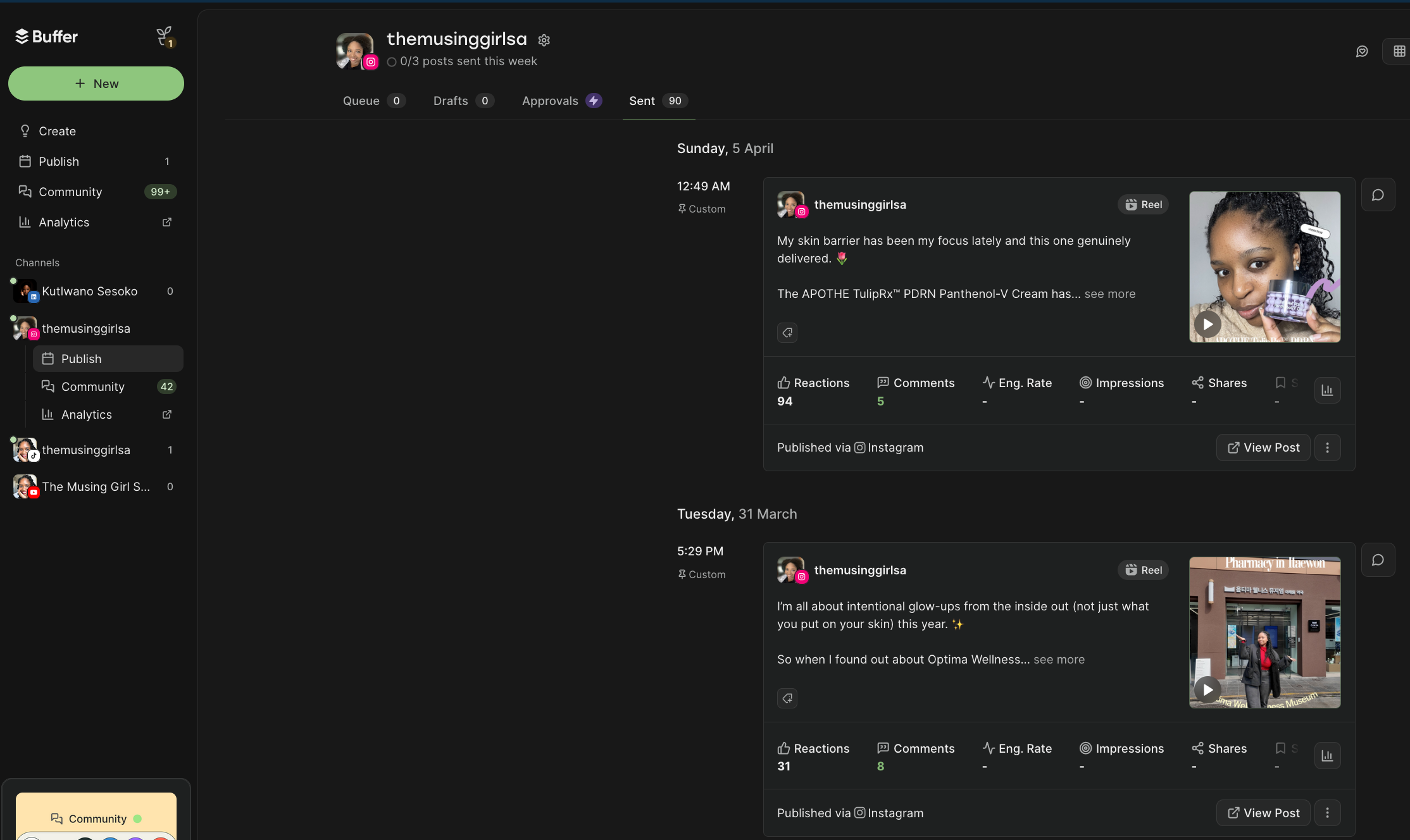
Buffer is the scheduling tool that gets out of your way. No bloat, no learning curve, no features you'll never use. You connect your social channels, batch-schedule your content, and Buffer posts it while you're doing something else.
It supports nine platforms including Instagram, TikTok, LinkedIn, X, Pinterest, and YouTube, and its per-channel pricing model means you only pay for what you actually use. The Free plan covers three channels with 10 scheduled posts per channel, which is genuinely useful for testing. The Essentials plan at $6/month per channel unlocks unlimited scheduling and advanced analytics, and that's where most solo creators land.
What Buffer does particularly well is simplicity. The content calendar is clean, the AI caption assistant is functional without being pushy, and the analytics are straightforward enough that you'll actually check them. It's not trying to be a full social media management suite, it's a scheduling tool that's very good at scheduling.
Advantage: Full control over whether posts are automatically posted after scheduling or whether you use Buffer as an assistant to help you post manually more easily.
Disadvantage: Buffer's per-channel model gets expensive if you're managing many accounts. Five channels on Essentials is $30/month, which is competitive, but ten channels starts to add up. If you're managing multiple brands or clients, compare it against flat-rate alternatives before committing.
Buffer price: Freemium - Paid plans start from $5 per month for one channel.
Kit: Email Marketing for Creators
Kit (formerly known as ConvertKit, rebranded in 2024) is built specifically for creators who want to own their audience, not rent it from an algorithm. It's a great alternative to Substack where your audience is not fully yours. Your email list is the only audience you actually own, and Kit is the tool most serious creators use to grow and monetize it.
The free Newsletter plan is one of the most generous in the category, covering up to 10,000 subscribers with unlimited emails, landing pages, forms, and one automation sequence, enough to build a real newsletter before spending a cent. The Creator plan starts at $39/month for up to 1,000 subscribers and unlocks unlimited automation workflows, integrations with 70+ tools, and the ability to sell digital products directly.
Where Kit earns its reputation is the visual automation builder. You can create sequences that tag subscribers based on behavior, send different content to different segments, and trigger workflows based on what people click or buy, all without writing a line of code. For creators building a paid newsletter, a digital product, or a community, that infrastructure is genuinely powerful.
Worth noting: Kit raised its prices significantly in September 2025. What used to start at $15/month now starts at $39/month for the Creator plan. If you're early stage and purely sending a newsletter, free alternatives like Beehiiv or Substack may serve you better until you need Kit's automation depth.
Advantage: The integration with other apps like Google Workspace, Zapier, etc. make it easy to create a content ecosystem. The Creator Network also creates a great opportunity to get new subscribers.
Disadvantage: Payments are processed through Stripe, so countries that don't have access to Stripe can't make the most of the paid features.
Kit price: Freemium - Paid plans from $39 per month.
Video Editing Tools: Edit Faster, Without Losing Quality
The editing phase is where most creator hours go. These two tools from Cutback tackle different parts of that problem, one before you touch your NLE, one inside it.
Selects: AI Pre-Editing Tool for Long-Form Video
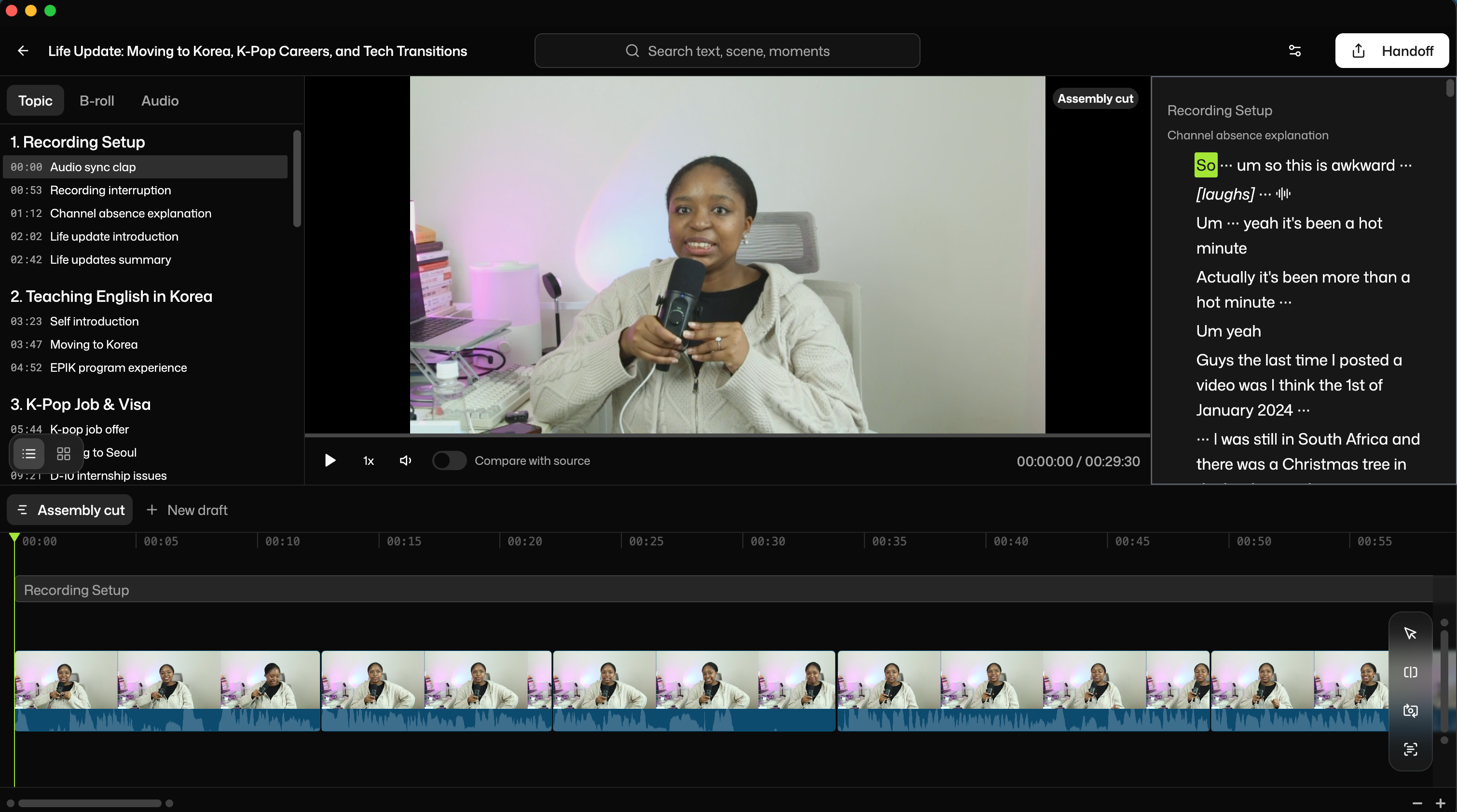
Before you can edit, you have to log footage. For anyone producing long-form content like YouTube videos, podcast recordings, and documentary-style content, logging and organizing raw footage is one of the most time-consuming parts of the entire workflow.
Selects is a standalone AI pre-editing tool that does that work for you. You upload your raw footage and Selects automatically transcribes it, segments it into chapters, annotates scenes, and detects speakers. From there, you build a stringout by selecting the transcript lines you want to keep or prompting for a narrative and Selects pulls the corresponding clips into a timeline.
You can also remove silences, cut filler words, and export an XML or timeline file directly into Premiere Pro, DaVinci Resolve, or Final Cut Pro.
The result is a rough assembly cut that's ready to fine-edit, without you having to scrub through hours of footage first or build a timeline on your own. For studios and teams producing high volumes of long-form content, the time saving compounds fast.
Selects is particularly strong for multicam and multi-speaker recordings. The speaker detection tags each voice automatically, so filtering footage by speaker requires no manual work.
Advantage: Saves 90% of the time you would have spent on setting up a project and doing the basic cuts (getting rid of the bad parts) of your raw footage. There's also a 'Edit with YouTube Link' feature that let's you copy the style of a YouTube video for your edit.
Disadvantage: The narrative prompt doesn't always give the desired outcome but the product is continuously improving. So, hopefully that improves over time.
Selects price: Paid plans starting from $16 per month for the annual plan.
Premiere Assistant: AI Plugin Inside of Adobe Premiere
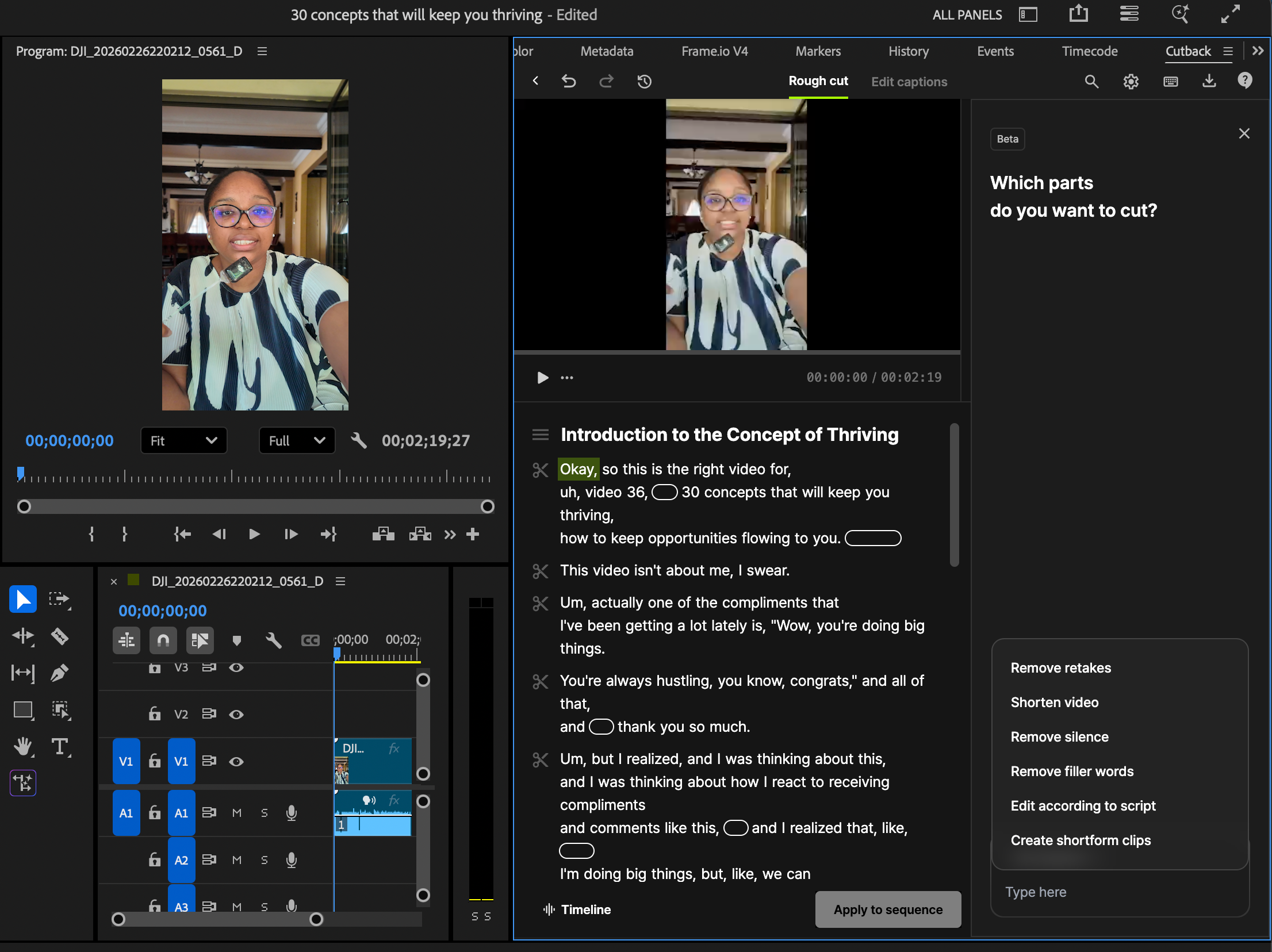
If Selects handles what happens before the edit, Premiere Assistant handles what happens inside it. It's an AI plugin that lives directly in Adobe Premiere Pro, bringing automation to the fine-editing stage without forcing you to leave your NLE.
Premiere Assistant is built for editors already working in Premiere who want to speed up repetitive tasks, generating captions, creating shortform clips (clipping), animating objects, removing background and more, without switching between tools or rebuilding their workflow. Everything happens inside the timeline you're already in.
For solo content creators, YouTubers, and even content creation teams whose entire workflow runs through Premiere Pro, the case for Premiere Assistant is simple: it reduces the mechanical work without touching the creative decisions that actually require an editor's eye.
Advantage: You can save presets for features like animated captions which helps with having a uniform feel across all of your videos, perfect for building a personal brand.
Disadvantage: There are some bugs here and there but nothing critical. Most of them can be troubleshooted.
Premiere Assistant price: Paid plans starting from $8 per month on an annual plan.
Building Your Stack
You don't need all five of these tools on day one. The right order depends on where your biggest bottleneck is right now.
If audience growth is your priority, start with Kit's free plan to build your email list and add ManyChat when your social engagement is consistent enough to automate. Buffer makes sense as soon as you're posting to more than two platforms and tired of crossposting fatigue.
If you're producing long-form video content and the editing timeline is your constraint, Selects is the entry point. It addresses the logging and assembly phase that most editors underestimate. Premiere Assistant extends that efficiency into the fine-edit stage.
The tools that earn a permanent place in your stack are the ones you'd notice immediately if they disappeared. Use that as your test.